
Vision Source
Something that sees: a player, a guard, a security camera, an RTS unit. Every update it computes the area visible from its position, clipped by the colliders around it. All other components work from this result.
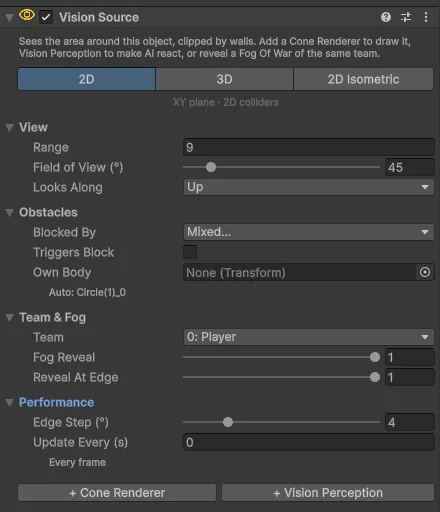
Settings
Mode
The tabs at the top: 2D, 3D or 2D Isometric. See Modes.
In 2D Isometric mode two more settings appear:
| Setting | Description |
|---|---|
| Isometric Grid | The Grid of your isometric tilemap. Its Cell Size sets the proportions |
| Tile Size (W × H) | Used when no grid is assigned: width and height of one tile on screen, the same numbers as the Grid's Cell Size. Default 1 × 0.5 |
View
| Setting | Default | Description |
|---|---|---|
| Range | 6 | How far the source sees, in world units. In isometric mode measured on the ground |
| Field of View (°) | 90 | Full opening angle. 360 sees in every direction |
| Looks Along | Up | 2D and isometric: which local axis of the object is the look direction (Up, Right, Down, Left). In 3D the object's forward axis is always used |
Obstacles
| Setting | Default | Description |
|---|---|---|
| Blocked By | Everything except Characters | Colliders on these layers block the view. Nothing makes a revealer without line of sight |
| Triggers Block | Off | Whether trigger colliders block the view too |
| Own Body | Auto | Colliders on this object and its children never block this source. Empty = found automatically; the Inspector shows which object was found |
More in Obstacles.
Team & Fog
| Setting | Default | Description |
|---|---|---|
| Team | 0 | The Fog Of War and Fog Hiders of this team are revealed by this source. See Teams |
| Fog Reveal | 1 | How much this source clears the fog: 1 = fully, lower = a dim half-light, for example for "sensing" what is near |
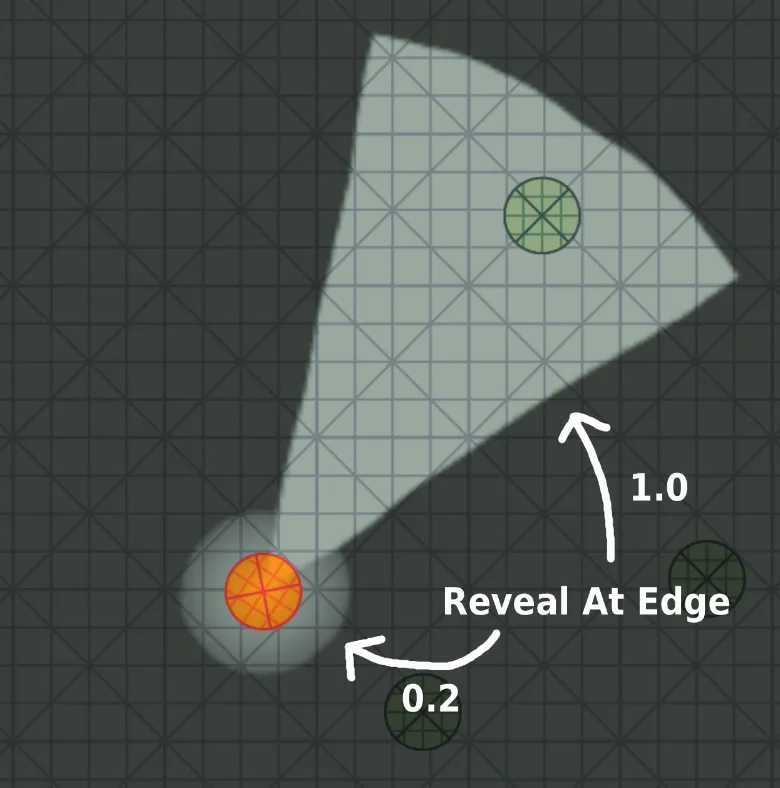
| Reveal At Edge | 1 | Reveal strength at the far edge relative to the center. Lower values fade out like a flashlight beam |
Fog Reveal and Reveal At Edge change only the fog picture. What the source sees for AI and Fog Hiders is not affected.
Performance
Folded by default.
| Setting | Default | Description |
|---|---|---|
| Edge Step (°) | 4 | Largest angle between rays along the far, rounded edge of the view. Smaller is rounder but costs more. Walls are always exact |
| Update Every (s) | 0 | Seconds between updates. 0 = every frame. See Updates and Quality |
Buttons
Below the settings, while they are missing:
- + Cone Renderer creates a child object with a Vision Cone Renderer. In 3D the child is placed on the floor below the source.
- + Vision Perception adds Vision Perception to the object.
Runtime
In Play mode: the number of points in the outline of the visible area, and whether the last update was recomputed or reused because nothing moved.
Scripting
Namespace Renvix.VisionFog.
| Member | Description |
|---|---|
bool CanSee(Vector3 worldPoint) | True if the point was visible in the latest update. In 2D a Vector2 works too |
bool CanSee(Vector3 worldPoint, ReadOnlySpan<int> ignoredColliderIds) | The same, but colliders with these instance ids do not block |
void ForceUpdate() | Recomputes right now instead of waiting for the next update |
event Action<VisionSource> Updated | Raised after the visible area has been recomputed |
bool HasResult | True once the visible area has been computed at least once |
int Version | Increases whenever the visible area changes. Compare it with a stored value to detect changes |
bool LastUpdateChanged | False if the latest update reused the previous result |
NativeArray<float2>.ReadOnly Boundary | Outline of the visible area in plane coordinates. Valid until the next update |
VisionShape Shape | Position, range and angles used for the latest update, in plane coordinates |
float EyeHeight | Height of the eyes at the latest update |
float2 ToPlane(Vector3) / Vector3 ToWorld(float2, float) | Converts between world positions and plane coordinates |
Transform Body | The body whose colliders are ignored, set or found automatically |
The settings are available as properties: Plane, Radius, FieldOfView, Team, ObstacleLayers, FogRevealStrength, FogRevealAtEdge, UpdateInterval, IsometricGrid, IsometricTileSize.
Example: check a point
using Renvix.VisionFog;
using UnityEngine;

public class Turret : MonoBehaviour
{
    [SerializeField] VisionSource eyes;
    [SerializeField] Transform player;

    void Update()
    {
        if (eyes.CanSee(player.position))
            Fire();
    }

    void Fire() { /* ... */ }
}
If the point is inside a collider that is on the source's Blocked By layers, for example the center of the player's own collider, the collider itself hides the point. Exclude the characters' layer from Blocked By, use the overload with ignored collider ids, or use Vision Target and Vision Perception, which handle this for you.
Example: change the view at runtime
// A flashlight that narrows and reaches further while aiming.
source.FieldOfView = aiming ? 30f : 70f;
source.Radius = aiming ? 12f : 7f;