
Detection Profile
An asset with the detection speed and memory of an observer. Create one per kind of observer, such as Guard, Camera or Dog, and share it between all observers of that kind. Changes to the asset apply to all of them, also in Play mode.
Create it with Assets > Create > Vision Fog > Detection Profile, or with the New button next to Profile in Vision Perception. Observers without a profile use the built-in defaults, which are the same as the defaults below.
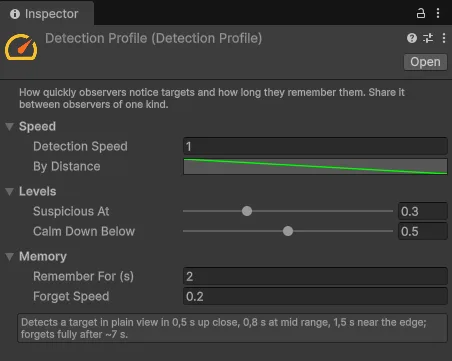
Settings
Speed
| Setting | Default | Description |
|---|---|---|
| Detection Speed | 1 | Awareness gained per second at distance factor 1. With 1, a target in plain view is detected in about one second |
| By Distance | 2 at the eyes to 0.5 at the edge | Speed multiplier by distance. Left = at the observer's eyes, right = at the edge of its range |
Levels
| Setting | Default | Description |
|---|---|---|
| Suspicious At | 0.3 | Awareness at which the observer becomes suspicious |
| Calm Down Below | 0.5 | An alerted observer becomes only suspicious again below this awareness |
Memory
| Setting | Default | Description |
|---|---|---|
| Remember For (s) | 2 | Seconds after losing sight before awareness starts to fall |
| Forget Speed | 0.2 | Awareness lost per second once forgetting has started |
Summary line
Below the settings, the Inspector sums the profile up in plain words, for example: "Detects a target in plain view in 0.5 s up close, 0.8 s at mid range, 1.5 s near the edge; forgets fully after ~7 s." Use it to check a profile without testing in Play mode.
These times are for a target with Noticeability 1. A target with Noticeability 0.5 takes twice as long.
Shaping the distance curve
The By Distance curve decides how the observer reacts at different distances:
- Smooth curve (the default): noticing gets slower the further away the target is.
- Stepped curve: separate zones, for example very fast detection within the nearest quarter of the range, normal speed in the middle, and very slow at the edge. Set the curve's keys to constant tangents to get steps.
- Value 0 near the edge: a "peripheral vision" zone. The cone is drawn there and On Spotted is raised, but awareness does not grow, so the player is not detected.
Examples
| Observer | Detection Speed | By Distance | Remember For | Forget Speed |
|---|---|---|---|---|
| Lazy guard | 0.6 | Default | 1 | 0.4 |
| Security camera | 1.5 | Flat at 1 | 0 | 1 |
| Hunting dog | 2 | Default | 6 | 0.1 |