
Vision Occluder
Sets how much the colliders on this object and its children let vision through. Add it to glass, fences, bushes, smoke or anything else that should not block like a wall. Objects without this component block fully.
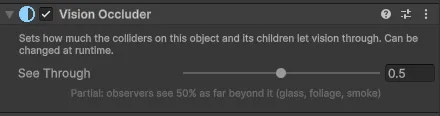
Settings
| Setting | Default | Description |
|---|---|---|
| See Through | 1 | How much vision passes through. 0 = blocks like a wall, 1 = fully see-through. In between, observers see that share of their remaining range beyond this object: 0.5 = half as far |
| Value | Typical use |
|---|---|
| 1 | Bars, grates, low fences, characters that should not block |
| 0.3 to 0.7 | Glass, foliage, smoke |
| 0 | A wall that can turn see-through later, e.g. a window before it shatters |
The setting affects everything that uses vision: cones, fog, Fog Hiders and Vision Perception.
Scripting
| Member | Description |
|---|---|
float SeeThrough | Can be changed at runtime |
static float Transmission(int colliderId) | How much the collider with this instance id lets through, 0 to 1 |
static bool IsSeeThrough(int colliderId) | True if the collider does not block at all |
// Smoke that clears over time.
occluder.SeeThrough = Mathf.MoveTowards(occluder.SeeThrough, 1f, Time.deltaTime * 0.2f);
When to use a layer instead
For many objects of the same kind that never change, such as all characters or all grass, it is simpler to put them on a layer that is not in the sources' Blocked By mask. See Obstacles.