
Vision Perception
Turns what a Vision Source sees into AI awareness. For each Vision Target it keeps an awareness meter that fills while the target is visible and falls after it is gone, three awareness levels, events, and the position where the target was last seen. It needs a Vision Source on the same object.
How awareness works
Awareness of each target is a value from 0 to 1.
- While the target is visible, awareness grows. The speed depends on the distance (closer = faster), set in the Detection Profile, and is multiplied by the target's Noticeability.
- At Suspicious At (0.3 by default) the observer becomes suspicious. At 1 it is alerted: the target is detected.
- After the target is gone, awareness stays for Remember For seconds, then falls at Forget Speed.
- An alerted observer drops back to suspicious below Calm Down Below, and becomes unaware again when awareness falls under half of Suspicious At. Because of this gap the level does not flicker when a target steps in and out of view at the edge.
The observer also remembers each target's last known position and velocity, so your AI can go to where the target was last seen and guess where it went.
Settings
Detection
| Setting | Default | Description |
|---|---|---|
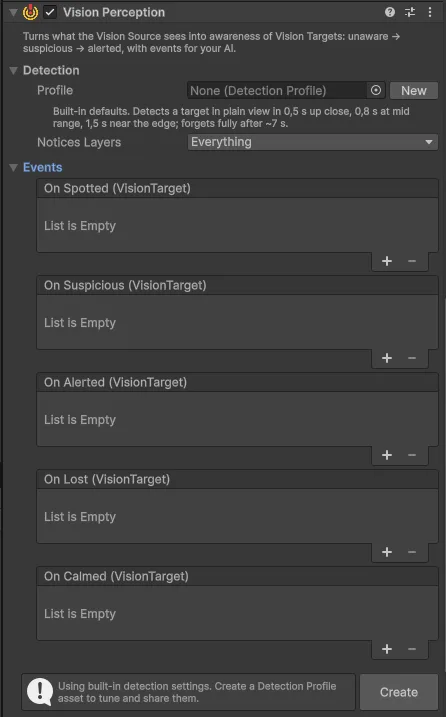
| Profile | Empty | The Detection Profile with detection speed and memory. Empty = built-in defaults. New creates a profile asset and assigns it |
| Notices Layers | Everything | Only Vision Targets on these layers are noticed |
Events
| Event | Raised when |
|---|---|
| On Spotted | A target came into view |
| On Suspicious | Awareness of a target reached the suspicion level, also when an alert cools down to suspicious |
| On Alerted | A target was fully detected |
| On Lost | A target went out of view |
| On Calmed | Awareness of a target dropped back to unaware |
Each event passes the VisionTarget it is about.
Runtime
In Play mode the Inspector shows a bar with the highest awareness and level, and a bar for each target the observer sees or remembers. In the Scene view, an observer that is suspicious or alerted shows ? or ! with its awareness in percent, and a marker at the last known position of each target it remembers.
Scripting
Namespace Renvix.VisionFog.
| Member | Description |
|---|---|
float Alertness | Highest awareness over all targets, 0 to 1 |
AwarenessLevel Level | Highest level over all targets: Unaware, Suspicious or Alerted |
VisionTarget PrimaryTarget | The target this observer is most aware of, or null |
IReadOnlyList<TrackedTarget> Tracked | Targets the observer sees now or still remembers |
bool TryGetTracked(VisionTarget, out TrackedTarget) | What the observer knows about one target |
void GetVisibleTargets(List<VisionTarget>) | Targets visible in the latest update |
void ForgetAll() | Clears all awareness and memory, e.g. after a respawn |
DetectionProfile Profile | The assigned profile, or the defaults |
VisionSource Source | The source this observer uses |
Events in code, each with the observer and the target: Spotted, Lost, BecameSuspicious, BecameAlerted, Calmed. AlertnessChanged is raised with the observer whenever Alertness or Level changes.
TrackedTarget contains:
| Member | Description |
|---|---|
Target | The target |
Awareness | Value (0 to 1), Level, Visible, TimeSinceSeen |
IsVisible | Visible in the latest update |
LastKnownPosition, LastKnownVelocity | Where the target was and how it moved when last seen |
LastSeenTime, LastSeenDistance | When and how far away it was last seen |
Example: a simple guard
using Renvix.VisionFog;
using UnityEngine;

public class Guard : MonoBehaviour
{
    VisionPerception _perception;

    void Awake() => _perception = GetComponent<VisionPerception>();

    void Update()
    {
        VisionTarget target = _perception.PrimaryTarget;
        if (target == null || !_perception.TryGetTracked(target, out var tracked))
        {
            Patrol();
            return;
        }

        switch (tracked.Awareness.Level)
        {
            case AwarenessLevel.Suspicious:
                LookAt(tracked.LastKnownPosition);
                break;
            case AwarenessLevel.Alerted:
                if (tracked.IsVisible) Chase(target.Position);
                else MoveTo(tracked.LastKnownPosition + tracked.LastKnownVelocity);
                break;
        }
    }

    void Patrol() { /* ... */ }
    void LookAt(Vector3 point) { /* ... */ }
    void Chase(Vector3 point) { /* ... */ }
    void MoveTo(Vector3 point) { /* ... */ }
}
The zombies in the demo shooter use this approach. Their full script is in Demo/Scripts/ZombieAI2D.cs.