
Vision Cone Renderer
Draws the visible area of a Vision Source, so the player can see where an observer is looking. The cone fades towards its far edge and, with a Vision Perception on the source, changes color as the observer becomes suspicious and alerted.
The quickest way to add one is the + Cone Renderer button in the Vision Source Inspector. It creates a child object with the component, placed on the floor in 3D.
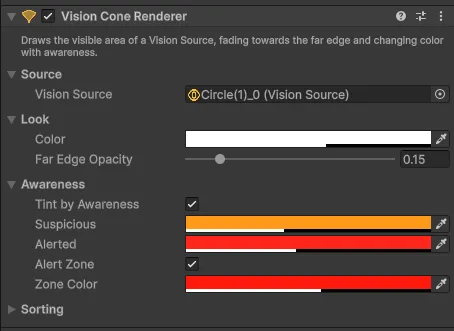
Settings
Source
| Setting | Default | Description |
|---|---|---|
| Vision Source | Auto | The source to draw. Empty = a Vision Source on this object or a parent |
In 3D the cone is drawn flat at the height of its own object. Keep the object just above the floor. If it is at eye height, the Inspector offers To Floor, which moves it down onto the floor below the source.
Look
| Setting | Default | Description |
|---|---|---|
| Color | Yellow, 35 % opacity | Color while the observer is unaware |
| Far Edge Opacity | 0.15 | Opacity at the far edge relative to the center. 1 = no fade |
Awareness
| Setting | Default | Description |
|---|---|---|
| Tint by Awareness | On | Blend towards the suspicious and alerted colors as awareness rises. Needs Vision Perception on the source |
| Suspicious | Orange | Color at the suspicion level |
| Alerted | Red | Color once the target is detected |
| Alert Zone | On | A zone grows from the eyes towards the target as awareness rises. When it reaches the target, the target is detected |
| Zone Color | Red | Color of the alert zone |
The alert zone shows the player how close a guard is to detecting them. It reaches from the eyes towards the observer's primary target, as far as the awareness: halfway at 50 %, at the target at 100 %.
Sorting
2D and 2D Isometric only, folded by default.
| Setting | Default | Description |
|---|---|---|
| Sorting Layer | Default | Like a sprite's sorting layer |
| Order in Layer | -1 | Draw order within the sorting layer |
In top-down 2D the cone is usually drawn under characters and walls, which the default order does.
In 2D Isometric the cone lies on the ground, so it must be drawn below walls, props and characters but above the floor tiles. Otherwise it looks as if it covers the objects instead of going behind them. If an obstacle sprite or tilemap is drawn under the cone, the Inspector shows a warning with both sorting values.
Material
By default all cones share one material with the Vision Fog/Vision Cone shader, so they can be batched. You can assign your own material to the Mesh Renderer. Colors and the fade are passed as vertex colors, so a custom shader should use them. The alert zone works only with the Vision Fog/Vision Cone shader.
Scripting
Namespace Renvix.VisionFog.Presentation.
| Member | Description |
|---|---|
VisionSource Source | The source being drawn |
Color Color | Color while unaware |
float EdgeOpacity | Opacity at the far edge relative to the center, 0 to 1 |
To hide a cone, disable the component or its object. Cones of observers that should be hidden in the fog can be hidden with a Fog Hider.