
Vision Fog: 2D/3D Fog of War, Line of Sight & Stealth Detection
Exact vision, stealth detection and fog of war for 2D and 3D
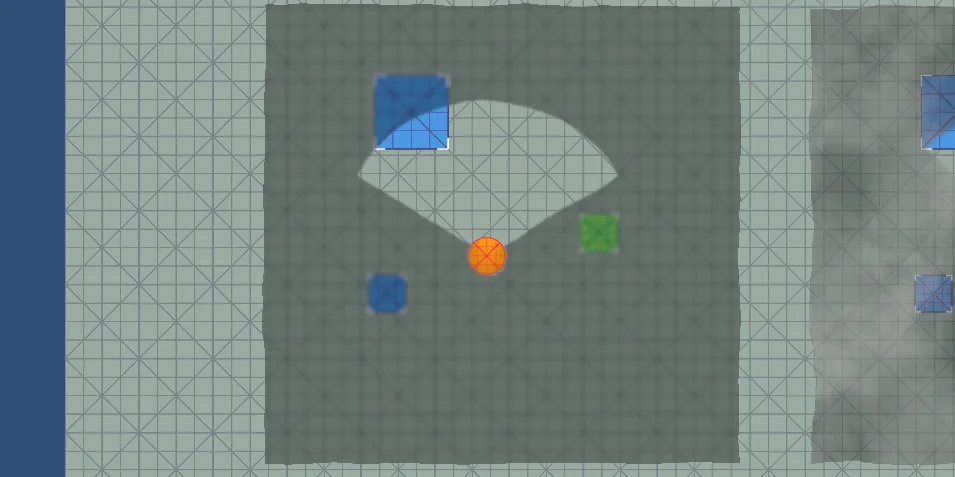
Vision Fog brings exact vision to your game: guards that see around corners correctly, notice the player gradually, and fog of war that reveals exactly what your units can see. One package for stealth, RTS, MOBA, tactics, roguelike and horror games, in 2D, 3D and isometric.
Try it yourself in the playable demo.
Exact vision, one source of truth
- The visible area is a precise polygon that follows every wall corner, not an approximation made of rays
- The same result drives everything: the drawn cone, the fog, the hidden objects and the AI checks. If the player sees a guard's cone touching him, the guard sees him too
- Partly see-through obstacles: glass, fences or bushes let a set share of vision through
- Revealer mode: units that reveal the fog without line of sight, much cheaper than full vision
Stealth detection
- Awareness meter instead of instant detection: guards go from unaware to suspicious to alerted
- Detection speed depends on distance, shaped with a curve: notice instantly up close, slowly at the edge of view
- Guards remember where they last saw the player, then calm down after a while
- Some targets are harder to spot: crouching, camouflage, darkness
- Large targets are noticed as soon as any part of them is visible
- Reusable Detection Profiles for different enemy types
- Events for spotted, lost, suspicious, alerted and calmed, in the Inspector or in code
Vision cones that tell the player what is going on
- Cones change color as a guard becomes suspicious and alerted
- Alert zone: a band grows from the guard's eyes towards the player as awareness rises. When it reaches the player, he is detected
- Soft fading edges, any color and opacity
Fog of war
- Remember explored areas, or show only what is visible right now (MOBA style)
- Teams: each team has its own fog and its own hidden enemies
- Three fog styles:
- Color, with optional drifting clouds
- Texture: your own texture, two layers drifting over each other
- Blur: the scene stays visible under the fog, blurred and dimmed
- Wall reveal modes: show just the edge of a seen wall, the side that is seen, or the whole object
- 3D: a flat fog layer, or fog projected onto all geometry, walls included, at any camera angle
- Soft edges that fade in and out smoothly and gently wobble
- Visible and explored areas exposed to scripts as textures, e.g. to mask your own minimap
Hide objects in the fog
- Enemies, items and props disappear when no one on the team sees them, and fade back in
- Buildings and landmarks can stay visible once discovered
- Works with sprites, meshes and any renderer
2D, 3D and isometric
The same components cover top-down 2D, 3D and 2D isometric games: switch with one tab in the Inspector.
Made for production
Burst and the Job System do the heavy work on worker threads, unchanged areas are skipped, and quality presets scale it down for mobile. The included benchmark runs 200 guards with exact line of sight among 300 obstacles at over 100 FPS in a build.
Easy to set up
Custom inspectors explain every setting and point out setup problems with one-click fixes. Drag the fog area right in the Scene view, name your teams in Project Settings.
Included demos
- A small stealth shooter: sneak past zombies in the fog
- Showcase scenes for each feature
- 2D and 3D benchmarks
Read it before you buy
Full documentation is public: setup, API reference, and the cases where this tool is the wrong choice.
Not sure it fits your project?
Ask about compatibility, licensing, or a bug. A person answers, usually within two business days.