
Stealth Guards
This guide builds a guard that patrols, stops when it notices something, chases the player once it is sure, searches the last known position when the player escapes, and comes to check noises. Vision Fog handles what the guard sees and how aware it is. Movement and decisions are your own code, and the guide shows how to connect the two.
The zombies in the demo shooter work this way. Their full script is Demo/Scripts/ZombieAI2D.cs.
1. Set up the guard
- Add Vision Source to the guard. Set Team to Enemies, Field of View to 70 to 100, and Range to the distance it should see.
- Click + Cone Renderer and + Vision Perception in the Vision Source Inspector.
- Create a Detection Profile with New and share it between all guards of this kind.
- Add Vision Target to the player.
2. Map awareness to behavior
Awareness has three levels, and each one is a natural state for the guard:
| Level | Typical behavior |
|---|---|
| Unaware | Patrol the route |
| Suspicious | Stop, turn towards the last known position, maybe walk there slowly |
| Alerted | Chase while the player is visible; when lost, go to where the player was last seen and search |
using Renvix.VisionFog;
using UnityEngine;

public class StealthGuard : MonoBehaviour
{
    [SerializeField] float searchTime = 4f;

    VisionPerception _perception;
    float _searchUntil;

    void Awake() => _perception = GetComponent<VisionPerception>();

    void Update()
    {
        VisionTarget target = _perception.PrimaryTarget;
        if (target == null || !_perception.TryGetTracked(target, out var tracked))
        {
            Patrol();
            return;
        }

        switch (tracked.Awareness.Level)
        {
            case AwarenessLevel.Unaware:
                Patrol();
                break;

            case AwarenessLevel.Suspicious:
                Stop();
                TurnTowards(tracked.LastKnownPosition);
                break;

            case AwarenessLevel.Alerted:
                if (tracked.IsVisible)
                {
                    MoveTo(target.Position, run: true);
                    _searchUntil = Time.time + searchTime;
                }
                else if (Time.time < _searchUntil)
                {
                    // Head where the player was going when it disappeared.
                    MoveTo(tracked.LastKnownPosition + tracked.LastKnownVelocity * 0.5f, run: true);
                }
                else
                {
                    LookAround();
                }
                break;
        }
    }

    void Patrol() { /* follow waypoints */ }
    void Stop() { /* ... */ }
    void TurnTowards(Vector3 point) { /* rotate the guard; the Vision Source turns with it */ }
    void MoveTo(Vector3 point, bool run) { /* NavMeshAgent, Rigidbody, your own pathfinding */ }
    void LookAround() { /* turn left and right */ }
}
The guard's awareness keeps working while it chases or searches: if the player stays out of sight for Remember For seconds, awareness starts to fall, the guard drops back to suspicious and finally to unaware, and returns to patrol by itself.
Use the events for one-time reactions instead of checking every frame:
void OnEnable()
{
    _perception.BecameAlerted += OnAlerted;
    _perception.Calmed += OnCalmed;
}

void OnDisable()
{
    _perception.BecameAlerted -= OnAlerted;
    _perception.Calmed -= OnCalmed;
}

void OnAlerted(VisionPerception observer, VisionTarget target) => PlaySound("alarm");
void OnCalmed(VisionPerception observer, VisionTarget target) => PlaySound("must have been the wind");
3. Show the player what the guard knows
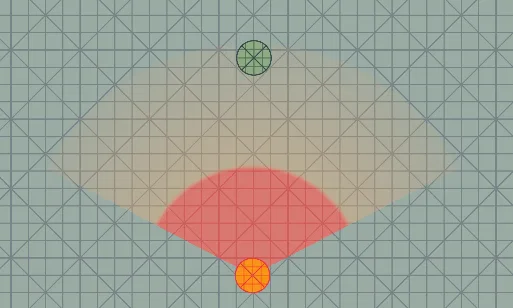
The Vision Cone Renderer already does most of this: the cone turns orange and red, and the alert zone grows towards the player. A ? or ! above the guard's head makes it even clearer. The demo's AwarenessIndicator.cs does exactly that and can be used as a starting point: it reads VisionPerception.Level and hides the sign while the guard is hidden by a Fog Hider.
4. Noise
Vision Perception only covers sight. Hearing is easy to add on top: when something makes a noise, tell the guards nearby where it was, and let them walk there like a suspicious guard would.
public class StealthGuard : MonoBehaviour
{
    static readonly System.Collections.Generic.List<StealthGuard> s_All = new();

    Vector3? _noise;

    void OnEnable() => s_All.Add(this);
    void OnDisable() => s_All.Remove(this);

    /// <summary>Call this from gunshots, breaking glass, thrown objects.</summary>
    public static void MakeNoise(Vector3 position, float radius)
    {
        foreach (StealthGuard guard in s_All)
            if (Vector3.Distance(guard.transform.position, position) <= radius)
                guard._noise = position;
    }

    // In Update, while the guard is Unaware or Suspicious:
    //     if (_noise.HasValue) { MoveTo(_noise.Value, run: false); clear _noise when arrived; }
}
The demo's pistol works this way: every shot calls ZombieAI2D.MakeNoise, and zombies in the noise radius come to check, even if they cannot see the player.
5. Stealth mechanics
All of these change only the player's Vision Target or the guard's Vision Source:
| Mechanic | How |
|---|---|
| Crouching, camouflage, shadows | Lower VisionTarget.Visibility, e.g. 0.5 while crouching |
| Invisibility | VisionTarget.Visibility = 0 |
| Low cover in 3D | Move the guard's eyes or the player's Visible Points; vision in 3D is cut at the eye height of the guard |
| Hiding in bushes | Vision Occluder on the bush with See Through 0 to 0.5 |
| Flashlight | Narrow FieldOfView and longer Radius on the source; Reveal At Edge below 1 for the fog |
| Guards on alert see further | Raise Radius on the source in BecameAlerted, set it back in Calmed |
| Respawn | VisionPerception.ForgetAll() on all guards |
6. Security cameras
A camera is a guard that does not move:
- Add Vision Source, Vision Perception and a cone to the camera object.
- Rotate the object back and forth from a script. The view turns with it.
- Give it its own Detection Profile, for example faster detection and no memory (Remember For 0), because a camera does not search.
- In
BecameAlerted, alert the guards nearby, for example with the same noise function.
A camera that stands still in a static room is nearly free, because its result is reused while nothing moves.