
Profiling
Unity Profiler
Vision Fog adds three markers to the CPU timeline of the Unity Profiler:
| Marker | Contents |
|---|---|
VisionFog.Gather | Physics queries and reading collider outlines, main thread |
VisionFog.Solve | Waiting for solve jobs that are still running after the gather |
VisionFog.Notify | Publishing results, rebuilding cones and the fog |
The solve jobs themselves appear on the worker thread rows as VisibilityJob.
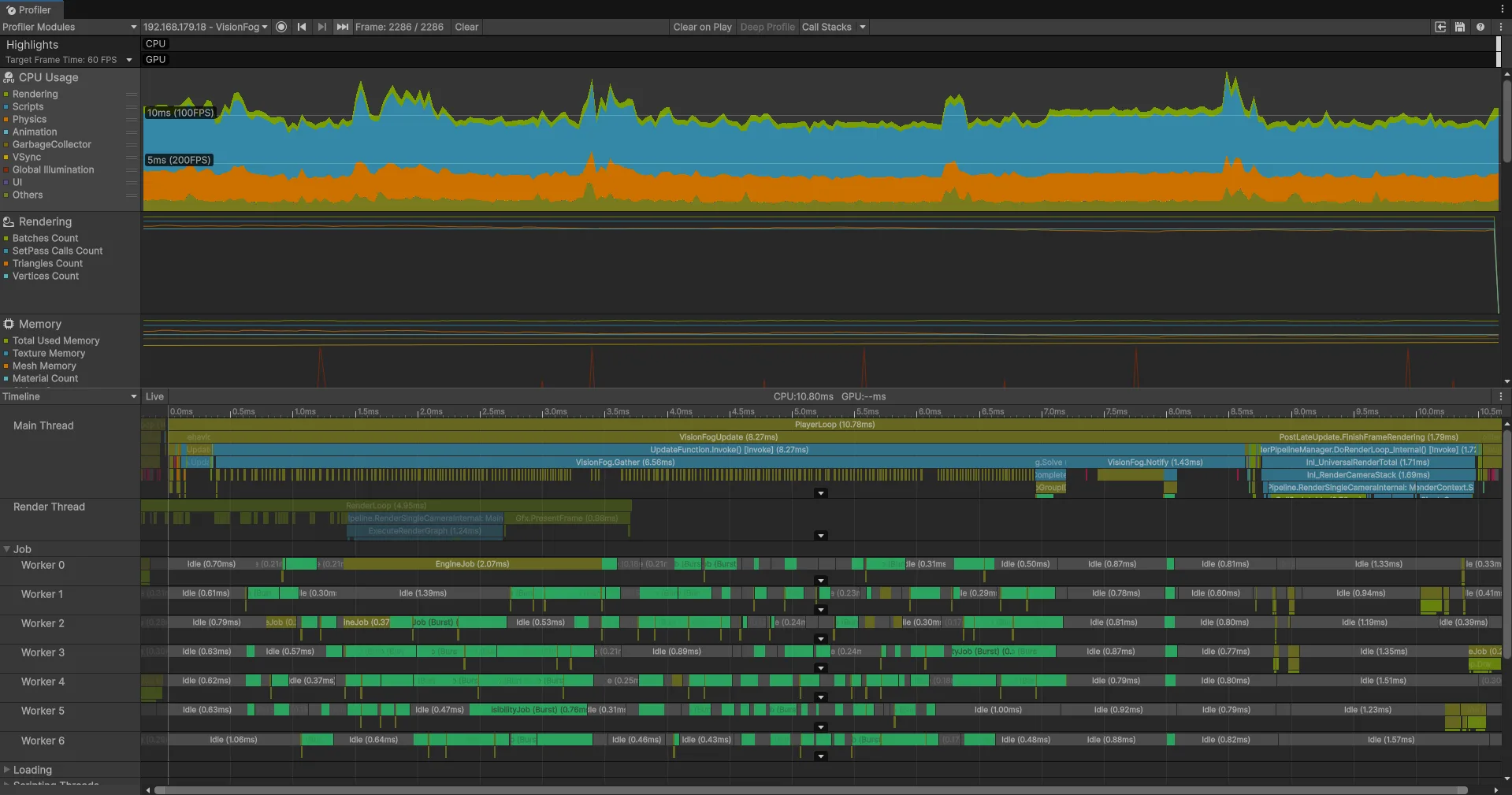
Profile a development build connected to the Profiler for realistic numbers. See Editor and builds.
Statistics in code
VisionSystem.LastStats holds the counters and timings of the most recent update. Show them in your own debug overlay:
using Renvix.VisionFog;
using UnityEngine;

public class VisionStatsOverlay : MonoBehaviour
{
    void OnGUI()
    {
        VisionSystemStats s = VisionSystem.LastStats;
        GUILayout.Label($"Vision Fog: {s.TotalMs:F2} ms, {s.UpdatedCount}/{s.SourceCount} sources updated, {s.SkippedCount} reused");
        GUILayout.Label($"gather {s.GatherMs:F2} (physics {s.PhysicsQueryMs:F2}, checks {s.ColliderChecksMs:F2}), " +
                        $"wait {s.SolveMs:F2}, notify {s.NotifyMs:F2} ms");
    }
}
| Field | Description |
|---|---|
SourceCount | Enabled sources |
UpdatedCount | Sources that were due for an update this frame |
SkippedCount | Updated sources whose surroundings did not change, so the previous result was reused |
SegmentCount | Obstacle edges gathered by all updated sources together |
BoundaryPointCount | Outline points produced by all updated sources together |
GatherMs | Main thread: physics queries and obstacle collection |
PhysicsQueryMs | Part of GatherMs: the physics overlap queries |
ColliderChecksMs | Part of GatherMs: the per-frame check whether each nearby collider moved or changed |
ScheduleMs | Main thread: starting the solve jobs |
SolveMs | Main thread: waiting for solves still running after the gather |
NotifyMs | Main thread: publishing results and rebuilding cone and fog meshes |
UsedJobs | True if the solves ran as Burst jobs |
TotalMs | The sum: main-thread time of the whole vision update |
VisionSystem.AfterUpdate is raised at the end of every update, a good moment to read the statistics.
What the numbers tell you
| High value | Likely cause | What to try |
|---|---|---|
PhysicsQueryMs | Many sources with a large Range, or many colliders on the Blocked By layers | Smaller ranges, fewer layers in Blocked By, Update Every for less important sources |
ColliderChecksMs | Very many colliders near the sources | Merge small colliders, use a Composite Collider 2D for tilemaps |
SegmentCount per source | Detailed colliders: mesh colliders, polygon colliders with many points | Simpler colliders for vision, e.g. boxes on a separate layer |
SolveMs | Not enough worker threads, or very complex scenes | Fewer updated sources per frame, larger Edge Step |
NotifyMs | Many cones and fogs being rebuilt | Fewer cones, lower fog Resolution |
Comparison switches
These switches exist to compare and debug. Keep their defaults in your game.
| Switch | Default | Off means |
|---|---|---|
VisionSystem.UseJobs | true | Everything runs on the main thread without Burst |
VisionSystem.OverlapGatherAndSolve | true | All solves start only after the whole gather |
Occluders2D.CacheEnabled, Occluders3D.CacheEnabled | true | Collider outlines are read again in every update |
Occluders2D and Occluders3D are in the Renvix.VisionFog.Occluders namespace.